
Bring in the jobs
Use current project timing and work assumptions rather than a separate planning spreadsheet.
Check department workload before promising the completion date.
For owners and production managers who need capacity behind the calendar.
Sales sees dates without department workload.
Unscheduled jobs disappear from the plan.
Bottlenecks surface only after work queues up.
Moving a job requires rebuilding the forecast.
Use current project timing and work assumptions rather than a separate planning spreadsheet.
See where demand concentrates across the parts of the shop that must perform it.
Keep work that needs a date visible until it is deliberately placed.
Move the plan and examine the resulting load before communicating the commitment.
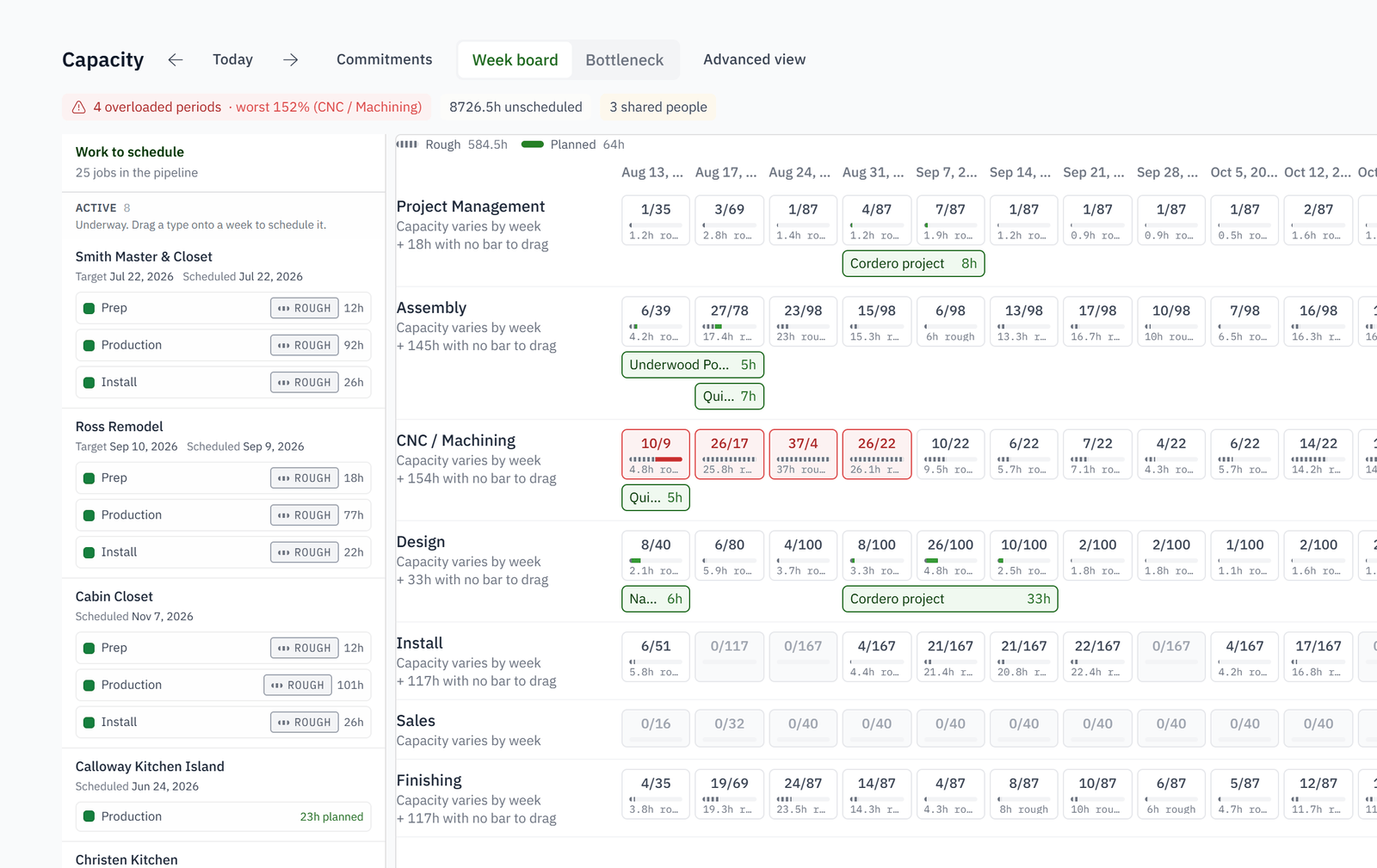
Put scheduled demand beside the department's working capacity so overload becomes a decision instead of a surprise.
It is measured, not typed in. Past days are the hours people actually clocked; future days use each department's configured supply.
Schedule, Outlook, Aging and Grid, plus the bottleneck headline that names the department the shop is waiting on.
It suggests. Moves that would relieve the bottleneck are offered, and you adopt or ignore them. Nothing is scheduled behind your back.
As an optional capability: a day-by-day production schedule with a lane per machine or station.
The week board is the plan; capacity is the check on it. A week that overloads a department shows it before you commit.
No. It shows load against supply so a person can decide. It does not optimise machines.